For companies of 40 to 250 people
Who is doing what, and who is on leave today
The team's tasks in one table, with leave right beside them: a request goes to the manager and to HR at the same time, and when someone is on leave you see it straight away next to their tasks. One system and one price for the whole company.
Demo without sign-up: a fictional network of clinics, and you walk in as the head of HR.

How it works
The road of a leave request
Four stops, and at each one you can see who has the request right now. When the road is blocked, HR sends it round a detour.
-
01
Employee
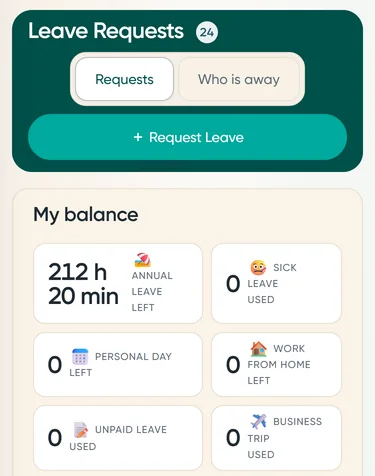
Files the request from a phone and sees how many days will be left before sending it.
-
02
Manager and HR
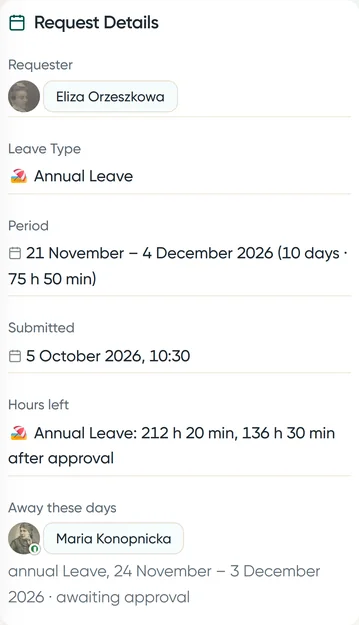
Approve in parallel, from a notification or in the system, and see the balance before they decide: what there is now and what there will be. HR has a queue of its own.
-
03 detour
The approver is gone
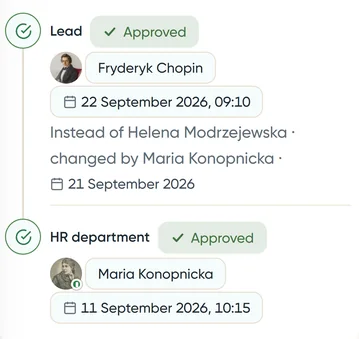
HR hands their step to someone else. The request keeps the trail: who was replaced, by whom and when. Nobody approves in someone else's name.
No request waits for weeks
-
04
Balance
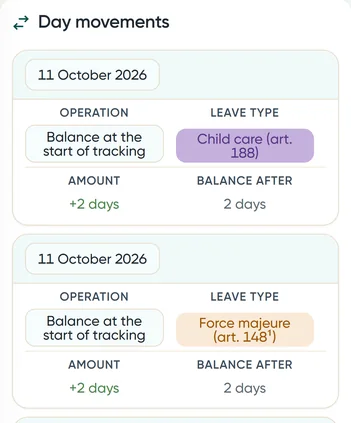
Every day granted and every day taken, for every person: you can see where the balance came from and where the days went.
Everyone can see who is on leave
Colleagues' leave as bars in the calendar, a "Who's away today" list in the side panel and a badge on the avatar next to tasks and in chats.

Not just leave
Tasks, meetings, documents, chats and notifications, plus dashboards, the company structure and news: all in the same system, behind the same sign-in. Automations and surveys are coming soon. All in the price.

Tasks: each with a checklist, comments and @mentions of colleagues, and all of them together in a table, on a board, in the calendar and on a Gantt chart.

Meetings in the calendar: the weekly briefing repeats by itself, people accept or decline, and while you pick a time you see who is busy then.

Documents of the company in zones and folders, with search: rules, templates and instructions in one place rather than in someone's inbox.

Chats: team groups and private messages, and you tag colleagues with @.

Notifications in the system and in Telegram: requests to decide on, mentions, meeting invitations and task deadlines, sorted by kind.

The company structure as a tree: the board, departments and sites with their managers, plus employee cards and teams.

Company news: the latest on top, marked "Unread", the rest below.

Dashboards with charts for HR and managers: leave and absences, the teams' work, with export.

Automations: "when, if, then" rules that do repetitive work by themselves, for example add an approved leave as a row in Excel or in a Google sheet. They also connect to Make, Zapier and n8n. The module is in testing; this screen is from the test version.

Surveys, anonymous or named: eNPS and your own questions, sent out again every month by themselves, results in charts and in Excel. In an anonymous survey nobody, HR included, can see who answered what. The module is being built; this screen is from its design.
And also: a Gantt chart, task templates and labels, broadcasts to teams, offboarding with a checklist for HR, support tickets and a Telegram bot.
Modules on request
Something missing? We'll build it.
Every company has something of its own: its own document flow, a report for the board, a survey for the team. You don't bend to the system; the system bends to you. Whatever helps others then reaches every client.
-
You tell us what's missing
On a call or in a message: what the module should do and who will use it.
-
We show the screens before any code
A design on your own company's example. You decide; we tell you how much work it is and when it will be ready.
-
We test it on a separate copy
A new module is tested first on a separate copy of the system, not on your data.
-
We switch it on for you
The module appears in your system. Nothing to install.
An example: surveys. On 9 October a client's HR department asked for a monthly eNPS with an Excel report. On 18 October the screen design was ready, and the module is being built now.
Tell us what you needPricing
One price for the whole company
You pay for the whole company by headcount. Every module included.
Every module included, a separate copy of the system at your own address and a daily backup. Prices are net of VAT.
Setup included: importing your structure and leave balances, training. A 30-day pilot on your own data.
Questions
Where is our data kept?
In a separate copy of the system for your company alone: its own database and its own address, backed up every night.
Does it know Polish leave law?
Yes. 20 or 26 days by seniority, four days on demand, a list of overdue leave for HR, leave in hours for medical providers. Weekends and public holidays, Christmas Eve included, never come off the balance, and a holiday on a Saturday gives another day off.
Will it replace our payroll and HR software?
No. Payroll and personnel files stay where they are. We take care of requests, approvals, balances and the everyday work.
What about electronic signatures?
There are none in the system. Signed documents stay in your document workflow system.
Is there an app?
It installs on the phone's home screen, without an app store. Notifications arrive in the system and in Telegram.
Can we try it without a call?
Yes: "Try the demo", then "Sign in to the demo", and you are inside a fictional network of clinics, with no sign-up and no password. The demo copy is yours alone for two hours, then it goes back to the start.
We will show it on the example of your company
Thirty minutes, your scenario. Or first click through the demo on your own, no sign-up.